When tablets first came out I thought that I would like one. Along came the Kindles, Nooks and iPad, etc. These tablets are cool, what would I use one for?
Here is what I came up with:
1. Check email without having to crank up the desktop or laptop.
2. Read my Kindle books.
3. Maybe watch a Youtube video that I received a note about.
As you can see the list is not very big. Tablets are nice and light for these tasks. Anything else will really tax the tablet and for what I wanted to initially accomplish these tasks can easily be handle by the tablet.
Recently I came across this interesting article: They Can Hear You Now: Verizon Patent Could Listen In On Customers and this one All Americans’ Emails Are Collected By The FBI, Says NSA Whistleblower or Americans Are The Most Spied On People In World History
Talk about Soviet Russia or even 1984... Wow! Not impressed with the encroachment of my personal correspondence and liberties. What a mess!
Now one question that I asked of myself was what kind of tablet should I get? Which one will allow me to control most of the tablets activities? Is there a way to maintain my privacy? I continued to review my wants and needs...
The tablet I ended up ordering was a Flytouch III. Not as flashy as the iPad or Samsung Galaxy. The Flytouch has Android OS Froyo 2.3.3, 16GB at the time I received it. I have had the tablet for about a year now. The Flytouch does what I need it to do and a little more.
So, what does this table have?
Android Froyo 2.3.3
2 x USB ports
1 RJ54 network jack
1 micro SD slot
1 HDMI
10.2" screen
1 GPS antenna connection w/ antenna
Pros
Let's see what the likes are and see if I reached my initial goals of getting a tablet.
1. Checks emails, fine, easy configuration. Check.
2. Kindle e-books, loaded, works great. Check.
3. Youtube access, works. Check.
4. Price was right at the time of purchase.
Bonus'
Attach the GPS antenna and drive around to test. Pretty accurate and a nice extra. Wi-Fi can be manually switched off. Don't need a network connection to use navigation feature. Just need the GPS antenna to utilize.
Cons
1. You get what you pay for. Construction is good to fairly good. Some folks have issues with the tablet. Check the internet for reviews and comments. But, for me some of the cons were not enough to prevent me from getting one.
2. The audio and WiFi ckt has an isolation issue. I get a bit of noise over the audio channel. But, not bad enough or happening often enough that I cannot understand the audio.
3. Battery life when the WiFi is on will let you go for a few hours.
Summary
I have had the Flytouch III for about a year now. Happy with it and it does what I wanted to do. The GPS feature is nice and I have the power adapter for the auto. I can control the internet access with a switch and not worry about the software controlling network access from a remote source. This does not mean that when I finally connect to the internet a log of my activity is not sent anywhere. But, at least the log is not real time.
I clear the cache often and will have to research further to see if that also clears any log data that gets collected. At some point I will root the device to see about cleaning out some of the un-needed utilities.
This tablet may not be for you, but for some it may be just the ticket. Android can be configured to the users needs. Check it out and see if the Flytouch works. I have read the newer generation is much better all around.
Enjoy,
Sunday, December 9, 2012

Sunday, December 2, 2012
To Get Amazon Kindle for PC Working on Ubuntu 12.04...
On Ubuntu 10.04 I had the Amazon Kindle for PC working well. At the time there was a bit of trouble and had to spend some time hunting up what needed to be done to make it work. Recently I inherited a laptop from my wife and promptly dumped Winoz for Ubuntu 12.04.
The laptop is an HP Pavilion Entertainment PC. Ubuntu 12.04 works well on the the PC and graphics are nice and crisp. So far so good. I wanted to get Kindle for PC working and was having trouble. The configuration for Ubuntu 10.04 is different that what 12.04 used, however slight. I found a couple of useful links that I will place here that will help one get the job done quickly. No need for me to go into any detail as these links provide all the info needed.
I hope this helps someone out and saves them the hassle of banging their head against the wall.
Amazon Kindle for PC
Remove or Rename a Wine file
The two links above will have you on your way to accessing the Kindle material in no time.
Enjoy,
The laptop is an HP Pavilion Entertainment PC. Ubuntu 12.04 works well on the the PC and graphics are nice and crisp. So far so good. I wanted to get Kindle for PC working and was having trouble. The configuration for Ubuntu 10.04 is different that what 12.04 used, however slight. I found a couple of useful links that I will place here that will help one get the job done quickly. No need for me to go into any detail as these links provide all the info needed.
I hope this helps someone out and saves them the hassle of banging their head against the wall.
Amazon Kindle for PC
Remove or Rename a Wine file
The two links above will have you on your way to accessing the Kindle material in no time.
Enjoy,
Saturday, November 3, 2012
A Better Knife Sheath...
My last post was about picking up a durable knife on the cheap. While this knife takes up an edge and holds it well the sheath was only fair. I say fair because the nylon it is made of is feels rather thin. Single stitched around the edges and no keeper strap for the handle. In the past I lost is really good knife because of a lack of a keeper that went around the handle on the top portion of the sheath.
I set about searching the net for a way to make a knife sheath. A lot of the knives in am interested in have a kydex or high impact plastic sheath with rivets or metal joiners. The joiners can be made of steel or aluminum.
I found a really good tutorial on making a knife sheath here: Willow Haven Outdoor.
From there I was lead here: Knife Kits. Off I went and placed the order. Everything arrived promptly. The sheet of Kydex was 12" X 12", big enough for my project.
I measured everything two or three times to make sure I had it sized. I ended up using half the sheet. I don't have a way to secure the rivets nicely. I found that the grommet tool I have was to small or to big to make the finish look nice. No worries there as Knife Kits also sells a proper rivet tool for making a knife sheath. I did not order it, but just wanted to mention it.
Due to the shape of the knife I could not get the belt loop on the sheath itself. I used a piece of Kydex and some joiners I got at the local hardware store to attach it. A little bit of Lok-Tite and wham I have a decent functional knife sheath. The knife snaps right in and is secure.
Below are some pics. Not to bad for my first go at something like this.


I set about searching the net for a way to make a knife sheath. A lot of the knives in am interested in have a kydex or high impact plastic sheath with rivets or metal joiners. The joiners can be made of steel or aluminum.
I found a really good tutorial on making a knife sheath here: Willow Haven Outdoor.
From there I was lead here: Knife Kits. Off I went and placed the order. Everything arrived promptly. The sheet of Kydex was 12" X 12", big enough for my project.
I measured everything two or three times to make sure I had it sized. I ended up using half the sheet. I don't have a way to secure the rivets nicely. I found that the grommet tool I have was to small or to big to make the finish look nice. No worries there as Knife Kits also sells a proper rivet tool for making a knife sheath. I did not order it, but just wanted to mention it.
Due to the shape of the knife I could not get the belt loop on the sheath itself. I used a piece of Kydex and some joiners I got at the local hardware store to attach it. A little bit of Lok-Tite and wham I have a decent functional knife sheath. The knife snaps right in and is secure.
Below are some pics. Not to bad for my first go at something like this.
Sunday, October 28, 2012
A Knife the won't break the wallet...
I suppose one has to ask what am I going to use the knife for? For me I am just a person who likes to get out into the woods and wander around. Sometimes I camp, hike, hunt, or I just like the peace and quite.
I was poking around Tractor's Supply the other day and came across a knife in the bargain bin. A full tang drop tip goody and a full 3/16" thick, stainless steel to boot. The edge looked rough, but I figure I could work that into shape without to much trouble. The scales are of wood, not to bad looking if you are one of those who needs a knife to look good. So, I picked one up for 10.00$ to check it out. The knife came with a nylon sheath of fair quality.
When I got home I set to sharpening the knife. Did not take to long to get an edge that would shave the hair off my arm. I wrapped the handle with some cloth friction tape to help with the grip. I add tape with just about every knife I own. The tape also helped with keeping the knife securely in the sheath I discovered. I foresee a problem with drawing the knife with the tape. Since the sheath is flexible two hands will be needed if the tape is left on. A little bit of caution will be needed when drawing the knife. Or I come up with a different sheath to carry the knife. Also, added a bit of small bungi-cord with a retainer as a handle keeper and lanyard.
Tip to tip is 8 3/4", blade is 3 3/4" in length.
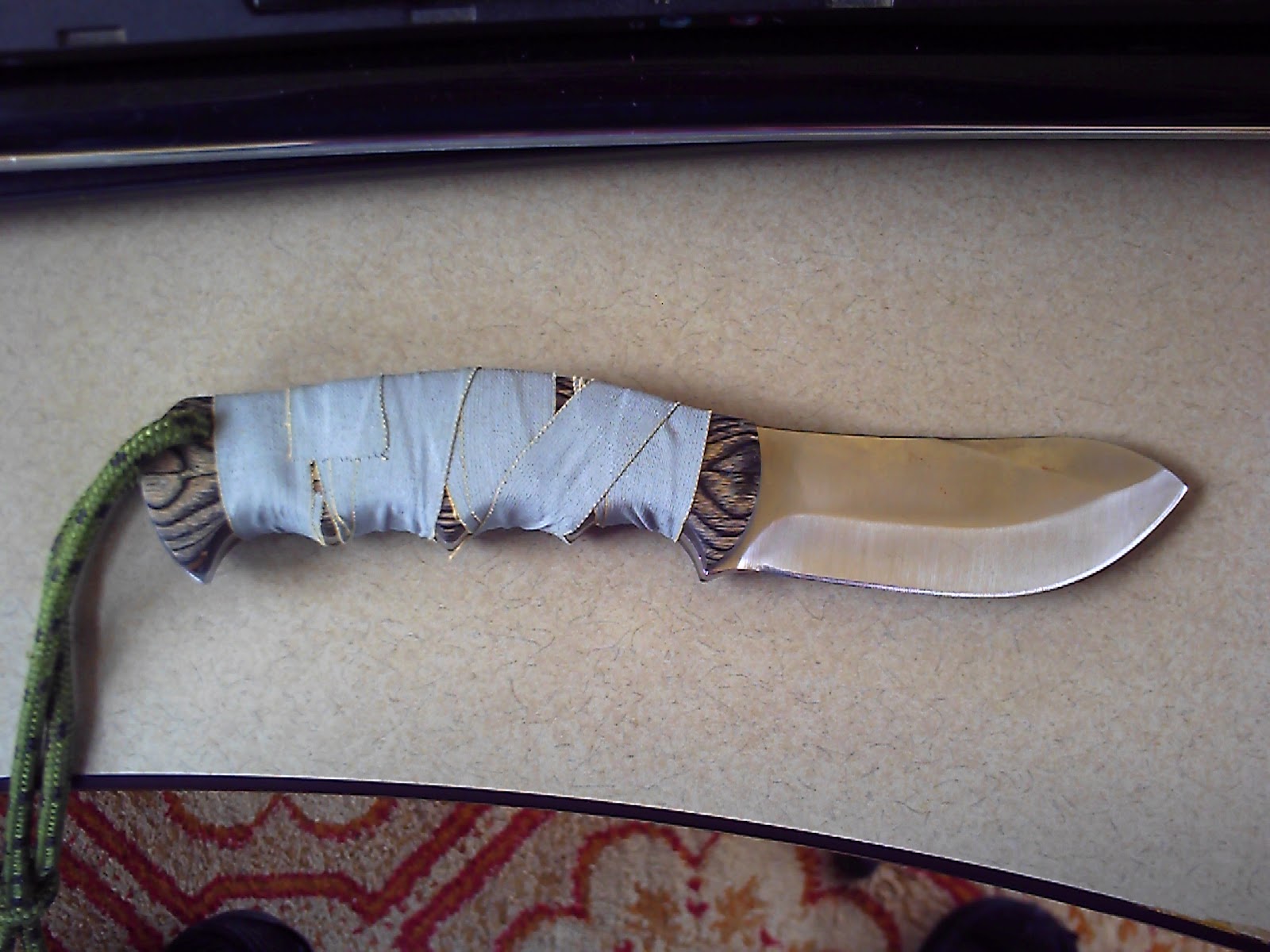


The real test will be to take it out into the woods and beat it up a bit. For example how will it perform using to baton some kindling? Will the edge just roll over? I will find out shortly. If it fails I will find a use for it. While it may not be good for extreme camp use I can put a good edge on it to skin the critters. And if it is good enough to skin it will have multiple uses for sure.
Enjoy
I was poking around Tractor's Supply the other day and came across a knife in the bargain bin. A full tang drop tip goody and a full 3/16" thick, stainless steel to boot. The edge looked rough, but I figure I could work that into shape without to much trouble. The scales are of wood, not to bad looking if you are one of those who needs a knife to look good. So, I picked one up for 10.00$ to check it out. The knife came with a nylon sheath of fair quality.
When I got home I set to sharpening the knife. Did not take to long to get an edge that would shave the hair off my arm. I wrapped the handle with some cloth friction tape to help with the grip. I add tape with just about every knife I own. The tape also helped with keeping the knife securely in the sheath I discovered. I foresee a problem with drawing the knife with the tape. Since the sheath is flexible two hands will be needed if the tape is left on. A little bit of caution will be needed when drawing the knife. Or I come up with a different sheath to carry the knife. Also, added a bit of small bungi-cord with a retainer as a handle keeper and lanyard.
Tip to tip is 8 3/4", blade is 3 3/4" in length.
The real test will be to take it out into the woods and beat it up a bit. For example how will it perform using to baton some kindling? Will the edge just roll over? I will find out shortly. If it fails I will find a use for it. While it may not be good for extreme camp use I can put a good edge on it to skin the critters. And if it is good enough to skin it will have multiple uses for sure.
Enjoy
Friday, October 19, 2012
To Send an Image or Data without Internet
Let's say there is some sort of disaster where the internet is not working in my area, phones are down, the cellular network generators have run out of fuel and batteries have died. How would one communicate in such an environment?
As of late I have been tinkering with RTTY, Contestia, PSK using my PC and radio. The program I use on the PC is fldigi. I run Ubuntu 12.04 at the moment and have been having good luck with it. Not real happy with the new desktop and fell back to the Gnome desktop and interface. Enough of that.
Anyway, I have been operating on 20m, 40m, 80m in data mode. Made contacts as far as OH, lower NY, SC in the evening with little power out. I will need to continue my testing to see how far I can get. Folks from all over the world use this mode of communication to pass data. It is exciting to know that anything from SITREP to images (using QSSTV) can be sent in these modes. The new version of QSSTV just got loaded on the PC. I need to test since I used a much older version. The caveat for any of this is atmospheric conditions.
What do you need to try it out? An amateur radio license (simple enough to get), radio, PC, interface cable. All the software is free. Unless you are a Windoz fan.
Enjoy
As of late I have been tinkering with RTTY, Contestia, PSK using my PC and radio. The program I use on the PC is fldigi. I run Ubuntu 12.04 at the moment and have been having good luck with it. Not real happy with the new desktop and fell back to the Gnome desktop and interface. Enough of that.
Anyway, I have been operating on 20m, 40m, 80m in data mode. Made contacts as far as OH, lower NY, SC in the evening with little power out. I will need to continue my testing to see how far I can get. Folks from all over the world use this mode of communication to pass data. It is exciting to know that anything from SITREP to images (using QSSTV) can be sent in these modes. The new version of QSSTV just got loaded on the PC. I need to test since I used a much older version. The caveat for any of this is atmospheric conditions.
What do you need to try it out? An amateur radio license (simple enough to get), radio, PC, interface cable. All the software is free. Unless you are a Windoz fan.
Enjoy
Monday, October 8, 2012
Improve Radio Reception...
Not to long ago I had one of my multiband dipoles break. I thought that it would be a good idea to fix it before the snow comes along. Most good radio operators wait until there is a couple feet of snow before working on antennas. But, I broke the rules and made a new one with a 4:1 balun and 120' of #12 ga. wire. I also had to re-solder the PL-259 connector on the cable.
Well, the results were very good. I can tune up on the bands I use as well as listen to the shortwave frequencies. The signals were booming in up here in the north. But, it is evening and the bands have fallen off with lots of atmospheric noise. I read earlier today that the sun had a CME and maybe if the sky is clear I will get to see the northern lights.
I also changed the orientation on another dipole I use for shortwave. Wow, that did the trick. I think I will have to continue to tinker with that one and get the ends unrolled. At the moment the antenna is up in the rafters on the porch. I will move it to the outside and hang somewhere. I am confident that the reception will be much better.
The great thing about the WWW is that there are a ton of resources to review. A little bit of experimenting on your part will go a long way.
Enjoy,
Well, the results were very good. I can tune up on the bands I use as well as listen to the shortwave frequencies. The signals were booming in up here in the north. But, it is evening and the bands have fallen off with lots of atmospheric noise. I read earlier today that the sun had a CME and maybe if the sky is clear I will get to see the northern lights.
I also changed the orientation on another dipole I use for shortwave. Wow, that did the trick. I think I will have to continue to tinker with that one and get the ends unrolled. At the moment the antenna is up in the rafters on the porch. I will move it to the outside and hang somewhere. I am confident that the reception will be much better.
The great thing about the WWW is that there are a ton of resources to review. A little bit of experimenting on your part will go a long way.
Enjoy,
Thursday, September 20, 2012
To See Something Cool....
Tonight I was sitting at the PC doing some homework and decided to take a break. I looked out the window and saw five deer under the apple tree having a snack. One was a big doe with two fawns and the other two looked to be yearling does.
I had to grab the camera and see if I could sneak out and around the corner to get a bit of video. Sure enough they hung around and posed for some pictures. But, not long after that they decided to move on to pickings else where.
With fall coming on I am sure they will be returning to snack until the apples are gone. Check out the video below.
Deer Munching Apples
Just one of those things that brings a smile to your face.
Enjoy
I had to grab the camera and see if I could sneak out and around the corner to get a bit of video. Sure enough they hung around and posed for some pictures. But, not long after that they decided to move on to pickings else where.
With fall coming on I am sure they will be returning to snack until the apples are gone. Check out the video below.
Deer Munching Apples
Just one of those things that brings a smile to your face.
Enjoy
Subscribe to:
Posts (Atom)